(Download the code for this article here)
One of the challenges in managing large, high-availability MS SQL Server systems, is to ensure that the failovers happen without a hitch.
SQL Agent Jobs are not replicated, and cannot be part of a SQL Server Availability Group (AG), so when a failover happens, jobs do not detect that the databases they rely on, are no longer available on that server node.
In this article, I show one implementation of a technique, to fail over the SQL Agent Jobs, ensuring that the right jobs are run on the right servers, according to what Always-On node it is currently regardless of failovers.
The technique is based on an article from 2010 by Kevin Cox @ Microsoft SQL Advisory Team here, which was written for SQL 2008 Mirroring, not HADR High Availability.
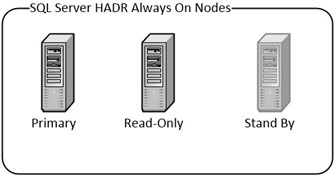
In this scenario we have a three server, Always-On HADR cluster:
There are three important databases on these servers, which are being replicated in Always-On HADR Availability Groups.
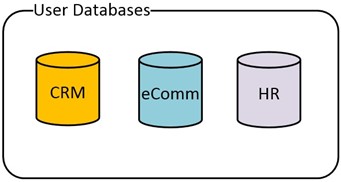
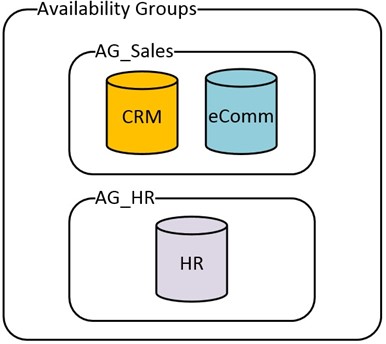
The first two databases are closely related to each other, so they are in their own Availability Group. The HR database, being single purpose, is in a separate Availability Group.
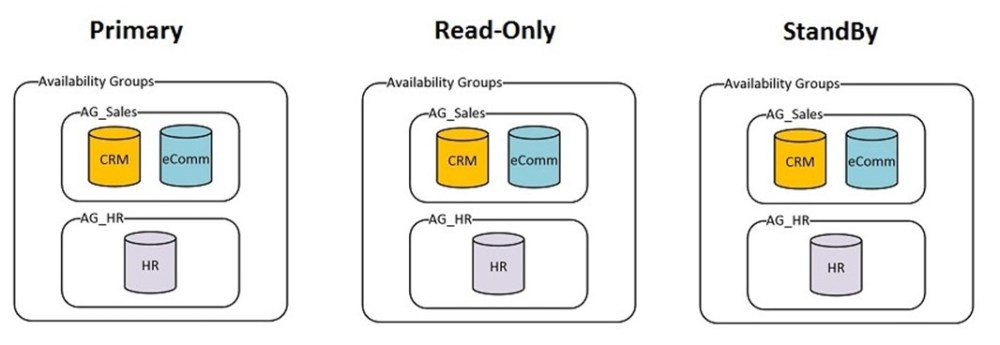
Full Picture of the Nodes, AG’s and Databases:
Here are some sample SQL Agent Jobs that would typically run:
| Job | Database dependency | What Node(s) to Run it on |
| Backup CRM DB |
CRM |
Read Only |
| Backup eComm DB |
eComm |
Read Only |
| Backup HR DB |
HR |
Read Only |
| Sales Analytics |
CRM + eComm |
Read Only |
| Rebuild Indexes HR |
HR |
Primary Node |
| Rebuild Indexes eComm |
eComm |
Primary Node |
| Rebuild Indexes CRM |
CRM |
Primary Node |
| Index Usage Stats CRM |
CRM |
Primary Node + Read Only |
Step 1. Create Job Categories on PRIMARY Node
We will use Job Categories, in SQL Agent, to categorize the jobs we want to fail over. Create the Job Categories on the PRIMARY node.
Each category will allow us to group SQL Agent Jobs together, that will be failed over together. Using our list of Jobs from above, we group them into failover categories:
| Job | Database dependency | What Node(s) to Run it on | Failover Job Category |
| Backup CRM DB |
CRM |
Read Only |
Sales_Failover_ReadOnly |
| Backup eComm DB |
eComm |
Read Only |
Sales_Failover_ReadOnly |
| Backup HR DB |
HR |
Read Only |
HR_Failover_ReadOnly |
| Sales Analytics |
CRM + eComm |
Read Only |
Sales_Failover_ReadOnly |
| Rebuild Indexes HR |
HR |
Primary Node |
HR_Failover_Primary |
| Rebuild Indexes eComm |
eComm |
Primary Node |
Sales_Failover_Primary |
| Rebuild Indexes CRM |
CRM |
Primary Node |
Sales_Failover_Primary |
| Index Usage Stats CRM |
CRM |
Primary Node + Read Only |
Sales_Failover_Primary_RO |
-- creates 2 local job categories
USE msdb ;
GO
EXEC dbo.sp_add_category
@class=N'JOB', @type=N'LOCAL', @name=N'Sales_Failover_ReadOnly';
GO
EXEC dbo.sp_add_category
@class=N'JOB', @type=N'LOCAL', @name=N'HR_Failover_ReadOnly';
GO
etc…
Alternatively, you could use the UI:
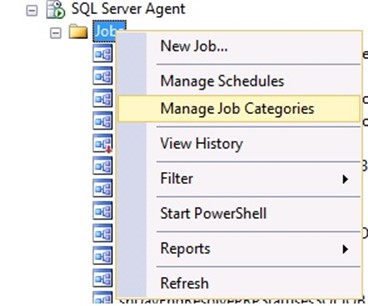
Step 2. SQL Agent Operators, Jobs on PRIMARY Node
Create SQL Agent Operators, if you want to use Operators in the Jobs.
Then create all the SQL Jobs that need to be ‘failed over’, onto the PRIMARY SQL Server node. Add their schedule, but keep the jobs disabled initially.
Make sure to assign the proper Failover Job Category for each job.
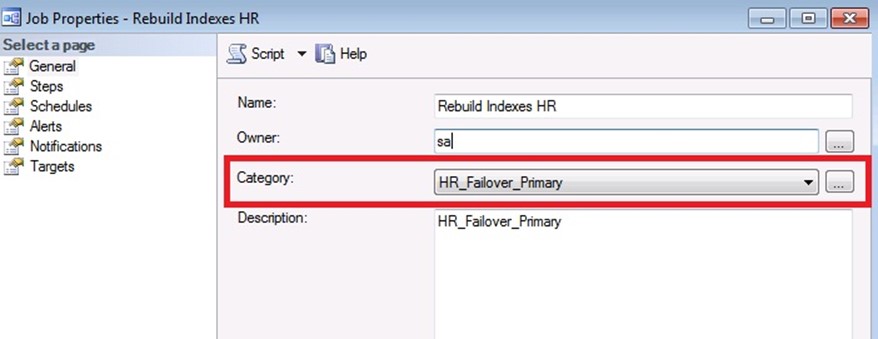
Step 3. Generate CREATE Scripts, for Operators, Jobs
Once you create the Operators and Jobs on the Primary node, you can generate the CREATE Script, to run it on the other two nodes.
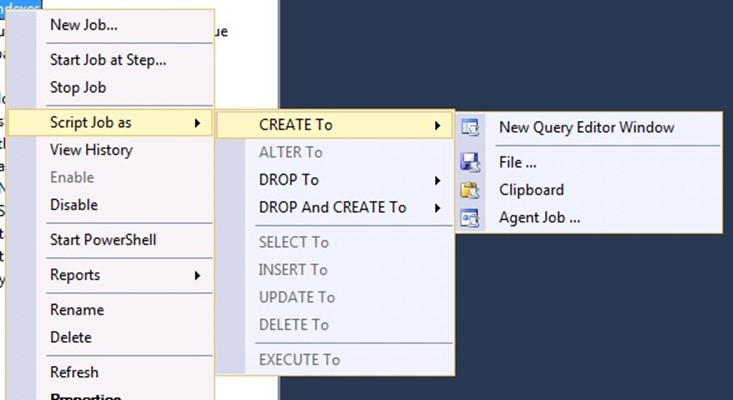
The Generate CREATE script function, for SQL Agent Jobs, will also include the CREATE T-SQL for the Job Category.
Step 4. Create an Independent database on each Node
This database will contain some configuration information about the Availability groups and the desired failover behaviour for the SQL Agent Jobs.
The disk space requirements for this database, are miniscule.
USE [master]
GO
CREATE DATABASE [ServerMonitor]
ON PRIMARY
( NAME =N'ServerMonitor',
FILENAME =N'E:\SqlData\ServerMonitor.mdf',
SIZE = 4096KB , MAXSIZE = UNLIMITED, FILEGROWTH = 1024KB )
LOG ON ( NAME = N'ServerMonitor_log', FILENAME =N'F:\SQLLogs\ServerMonitor_log.ldf',
SIZE = 1024KB , MAXSIZE = 4GB , FILEGROWTH = 10%)
GO
Create the tables that will hold the configuration:
USE ServerMonitor
GO
CREATE TABLE FailoverDbControl
(
  DatabaseName VARCHAR(100) NOT NULL,
    CONSTRAINT PK_FailoverLog PRIMARY KEY CLUSTERED (DatabaseName),
  LastKnown_Hadr_State VARCHAR(50) NULL,
  Normal_Hadr_State VARCHAR(50) NULL, /* PRIMARY, READONLY, STANDBY */
  LastCheck DATETIME CONSTRAINT DF_FailoverLog_LastCheck DEFAULT ( GETDATE()) ,
  LastChange DATETIME  CONSTRAINT DF_FailoverLog_LastChange DEFAULT ( GETDATE())
)
GO

CREATE TABLE JobsOnSQLFailover
(
  JobCategoryName VARCHAR(100) NOT NULL,
    CONSTRAINT PK_JobsOnSQLFailover PRIMARY KEY CLUSTERED (JobCategoryName),
  RunOnPrimaryNode TINYINT DEFAULT(0) NOT NULL,
  RunOnReadOnlyNode TINYINT DEFAULT(0) NOT NULL,
  RunOnStandByNode TINYINT DEFAULT(0) NOT NULL,
  DatabaseToCheck VARCHAR(100) NULL
)
GO


--Insert the data into the Configuration tables:

INSERT
INTO JobsOnSQLFailover
( JobCategoryName, RunOnPrimaryNode, RunOnReadOnlyNode, RunOnStandByNode, DatabaseToCheck)
VALUES
('Sales_FailOver_ReadOnly', 0, 1, 0,'eComm'),
('HR_FailOver_ReadOnly',0, 1 , 0,'HR'),
('Sales_Failover_Primary_RO',1, 1 , 0,'eComm') --, etc...
GO
INSERT INTO FailoverDbControl
( DatabaseName, LastKnown_Hadr_State, Normal_Hadr_State)
VALUES
('eComm','UNKNOWN','PRIMARY'),
('HR','UNKNOWN','PRIMARY')
GO
Create the supporting Stored procedures:
USE [ServerMonitor]
GO
SET ANSI_NULLS OFF
GO
SET QUOTED_IDENTIFIER OFF
GO
CREATE PROCEDURE [dbo].[DBAdminChangeJobStatus](@CategoryID int, @NewEnabledValue tinyint)
/*
    Purpose: sets Enabled/Disabled flag for each SQL Job in the given Job Category
*/
AS
SET NOCOUNT ON;
DECLARE @JobName nvarchar(128);
--Declare cursor
DECLARE curJobNameList CURSOR FAST_FORWARD FOR
  SELECT [name]
  FROM msdb.dbo.sysjobs
  WHERE category_id = @CategoryID

OPEN curJobNameList;
FETCH NEXT FROM curJobNameList INTO @JobName;

WHILE @@FETCH_STATUS = 0
BEGIN
   EXEC msdb.dbo.sp_update_job @job_name = @JobName, @enabled = @NewEnabledValue;
   FETCH NEXT FROM curJobNameList INTO @JobName;
END

CLOSE curJobNameList;
DEALLOCATE curJobNameList;
RETURN;

GO

SET ANSI_NULLS OFF
GO
SET QUOTED_IDENTIFIER OFF
GO

CREATE PROCEDURE [dbo].[DBAdminCheckHADRStatus]
/*
    Checks the status of the databases in the FailoverDBControl table, and
    if there's a change since last time checked, then enable/disable the
    SQL Jobs in the various dependent SQL Job Categories, according to
    the configuration set in JobsOnSQLFailover table
*/
AS
BEGIN
    SET NOCOUNT ON;
    DECLARE @DatabaseName nvarchar(128);
    DECLARE @BeginRunDateTimeStamp DATETIME
    SELECT @BeginRunDateTimeStamp = GETDATE()
    DECLARE
        @fdc_DatabaseName VARCHAR(100),
        @fdc_LastKnown_Hadr_State VARCHAR(50),
        @fdc_LastCheck DATETIME,
        @fdc_LastChange DATETIME,
        @fdc_Normal_Hadr_State VARCHAR(50),
        @current_Hadr_state VARCHAR(50), /* PRIMARY, READONLY, STANDBY */
        @current_db_state VARCHAR(50),
        @current_ReadOnlyState VARCHAR(50),
        @current_StandByState VARCHAR(50),
        @dbid INT,
        @CategoryName VARCHAR(50),
        @CatDatabase VARCHAR(50),
        @CatDb_HADR_State VARCHAR(50),
        @CategoryShouldRunOnPrimary TINYINT,
        @CategoryShouldRunOnReadOnly TINYINT,
        @CategoryShouldRunOnStandBy TINYINT,
        @CategoryID INT

    DECLARE curDb CURSOR FOR
      SELECT DatabaseName, LastKnown_Hadr_State, LastCheck, LastChange, Normal_Hadr_State
      FROM FailoverDbControl

    OPEN curDb
    FETCH NEXT FROM curDb
    INTO @fdc_DatabaseName,@fdc_LastKnown_Hadr_State,@fdc_LastCheck,@fdc_LastChange,
         @fdc_Normal_Hadr_State
/* for each database that we want to check for failover [dbo].[FailOverDbControl]
 Update the Table FailOverDbControl for those that have changed.
     Afterwards, we can select * from FailOverDbControl WHERE LastChange occurred since we started this proc.
 */

    WHILE @@FETCH_STATUS = 0
    BEGIN
        SELECT @dbid = DB_ID( @fdc_DatabaseName)
        /* Get IsPrimary State. Values: PRIMARY/SECONDARY */
        SELECT @current_db_state = rs.role_desc
        FROM master.sys.dm_hadr_database_replica_states AS db
            INNER JOIN
             master.sys.dm_hadr_availability_replica_states AS rs ON db.group_id = rs.group_id
            INNER JOIN master.sys.databases dbs ON db.database_id = dbs.database_id
        WHERE db.is_local = 1 AND rs.is_local = 1 AND db.database_id = @dbid

        /* Get STANDBY Mode info: */
        SELECT @current_StandByState = CASE
            WHEN ar.secondary_role_allow_connections = 0 THEN 'STANDBY'
            ELSE 'QUERYABLE' END
        FROM sys.databases d JOIN sys.availability_replicas ar on d.replica_id = ar.replica_id
        WHERE d.database_id = @dbid

        /* READ_ONLY */
        /* SELECT @current_ReadOnlyState = DATABASEPROPERTYEX(@fdc_DatabaseName, 'Updateability') */
        /* Current HADR state PRIMARY, READONLY, STANDBY */
        SELECT @current_Hadr_state =
            CASE
                WHEN @current_db_state = 'PRIMARY' THEN 'PRIMARY'
                WHEN @current_db_state <> 'PRIMARY' AND @current_StandByState ='STANDYBY'
                   THEN 'STANDBY'
                ELSE 'READONLY' END

        IF @fdc_LastKnown_Hadr_State <> @current_Hadr_state
        BEGIN
            UPDATE FailoverDbControl SET LastKnown_Hadr_State = @current_Hadr_state,
                   LastCheck = GETDATE(), LastChange =GETDATE()
            WHERE CURRENT OF curDb;
        END
        ELSE
        BEGIN
            UPDATE FailoverDbControl SET LastCheck =  GETDATE()
            WHERE CURRENT OF curDb;
        END

        FETCH NEXT FROM curDb
        INTO @fdc_DatabaseName,@fdc_LastKnown_Hadr_State,@fdc_LastCheck,@fdc_LastChange,
             @fdc_Normal_Hadr_State
    END

   CLOSE curDb;
   DEALLOCATE curDb;

    DECLARE curCategories CURSOR FOR
    SELECT j.JobCategoryName, j.RunOnPrimaryNode, j.RunOnReadOnlyNode,
           j.RunOnStandByNode, sc.category_id, lcs.DatabaseName, lcs.LastKnown_Hadr_State
    FROM JobsOnSQLFailover j INNER JOIN msdb.dbo.syscategories sc
        on j.JobCategoryName = sc.[name]
    INNER JOIN
       (SELECT DatabaseName, LastKnown_Hadr_State
        FROM FailoverDbControl WHERE LastChange > @BeginRunDateTimeStamp
        ) lcs
    ON j.DatabaseToCheck = lcs.DatabaseName

    OPEN curCategories
    FETCH NEXT FROM curCategories
    INTO @CategoryName, @CategoryShouldRunOnPrimary, @CategoryShouldRunOnReadOnly,
         @CategoryShouldRunOnStandBy, @CategoryId, @CatDatabase, @CatDb_HADR_State

    WHILE @@FETCH_STATUS = 0
    BEGIN
        IF @CatDb_HADR_State = 'PRIMARY' /* a new state */
        BEGIN
            PRINT 'FailOver Change to PRIMARY. Adjusting Jobs in category: ' + @CategoryName
            EXEC [dbo].[DBAdminChangeJobStatus] @CategoryID, @CategoryShouldRunOnPrimary
        END

        IF @CatDb_HADR_State = 'READONLY' /* a new state */
        BEGIN
            PRINT 'FailOver Change to READONLY. Adjusting Jobs in category: ' + @CategoryName
            EXEC [dbo].[DBAdminChangeJobStatus] @CategoryID, @CategoryShouldRunOnReadOnly
        END

        IF @CatDb_HADR_State = 'STANDBY' /* a new state */
        BEGIN
            PRINT 'FailOver Change to STANDBY. Adjusting Jobs in category: ' + @CategoryName
            EXEC [dbo].[DBAdminChangeJobStatus] @CategoryID, @CategoryShouldRunOnStandBy
        END


        FETCH NEXT FROM curCategories
        INTO @CategoryName, @CategoryShouldRunOnPrimary, @CategoryShouldRunOnReadOnly,
             @CategoryShouldRunOnStandBy, @CategoryId, @CatDatabase, @CatDb_HADR_State

    END

    CLOSE curCategories
    DEALLOCATE curCategories

    RETURN;
END

GO
Step 6. Copy the ServerMonitor
database to the other two Server Nodes.
I used ‘Generate Scripts’ as CREATE for the database, ran all the T-SQL scripts on the other two nodes. This database must be identical, and available on all three nodes no matter which one is primary for availability group, so do not replicate.
Step 7. Create and Schedule a Job, on each Node, to Monitor HADR status.
Finally, we need a SQL Agent Job, that checks to see if a failover has occurred, and enable / disable the SQL jobs according to the configuration in the JobsOnSQLFailover table.
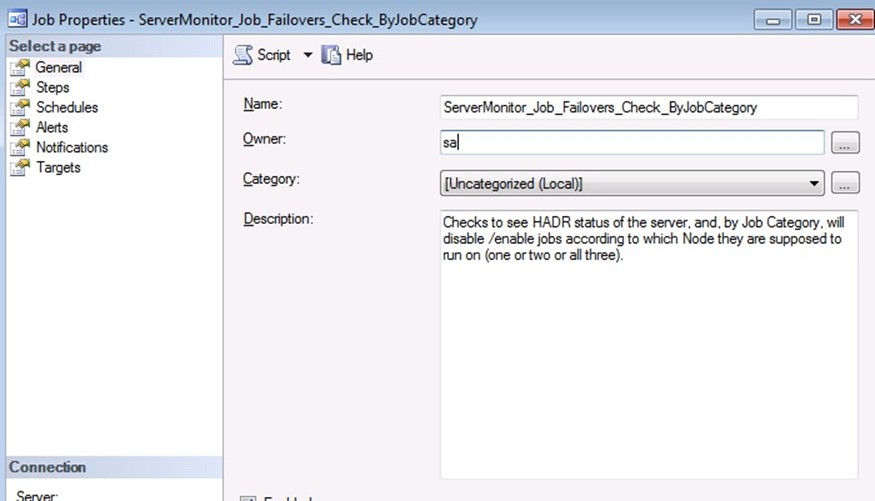
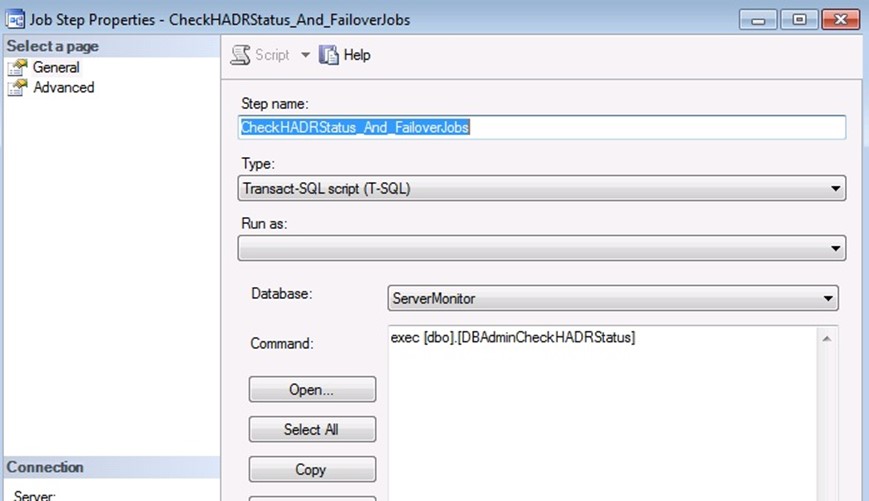
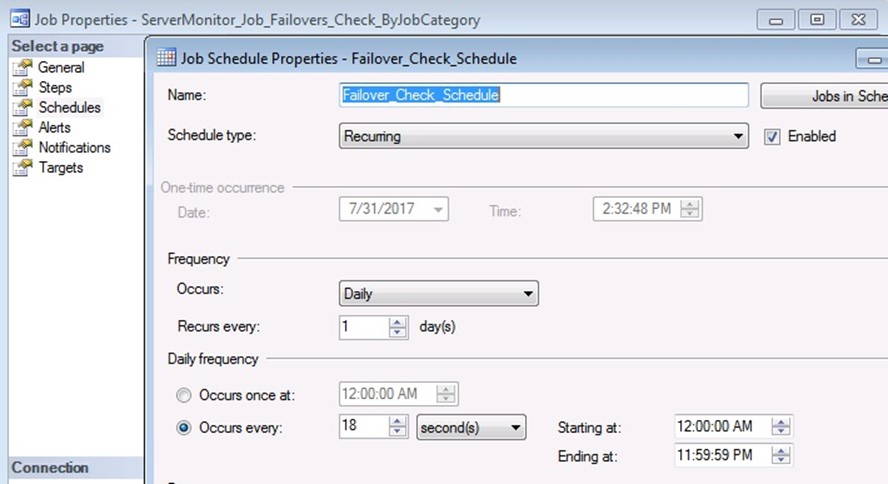
I scheduled it to run every 18 seconds; you may want a longer interval, maybe every 1 minute instead. The longer you make this interval, the more possibility that when a HADR failover occurs, a SQL Job may start on the wrong server and fail (because database not available).
Copy this job to all three servers. Do NOT put this job in one of our new SQL Agent Job Categories. You can see here, that I placed it into the [Uncategorized] category.
Initially, the state of the FailoverDbControl table, shows ‘Last Known HADR state’ = ‘Unknown’, so, the first time this monitoring Job runs, it will enable/disable all the jobs on that server, to their proper state.
Here is a sample output from the Job History:
| Date 7/31/2017 1:45:22 PM
Log Job History (ServerMonitor_Job_Failovers_Check_ByJobCategory) Step ID 1 Job Name ServerMonitor_Job_Failovers_Check_ByJobCategory Step Name CheckHADRStatus_And_FailoverJobs Duration 00:00:00 Message: Executed as user:. FailOver Change to PRIMARY. Adjusting Jobs in category: Sales_FailOver_Primary [SQLSTATE 01000] (Message 0) FailOver Change to PRIMARY. Adjusting Jobs in category: HR_FailOver_Primary [SQLSTATE 01000] (Message 0). The step succeeded. |
 Avalanche SQL Blog