Security

Security Lessons – et tu Microsoft?

When a new technology is introduced, it is introduced with big excitement.  The potential benefits are great, there’s lots of pundits writing articles, Techies vying for ‘expert’ status, Businesses jumping on the bandwagon.

Companies are racing to produce viable exciting products first.

In this pressure, I think safety and security are sometimes de-prioritized in favour of delivery of features.

Even in Medical devices, where one would think safety and security should be most critical.

Example:  the Bluetooth-enabled Heart Pacemaker, which was introduced in 2009.  It was a great invention, but with no security.   No encryption of data, and Hackers could gain control of the pacemaker, altering its settings or even disabling it, which could have life-threatening consequences.

Now with A.I. 

Microsoft produced an amazing AI system, but in what’s probably the smallest, easiest part of their AI system, they forgot all the hard-learned lessons of lack of security from its other products ( Windows, Excel, Word, Office, Internet Explorer).

Maybe the only way to protect the Co-Pilot plug-in eco-system would be to control it like Apple does its app store.

There is a way for companies rolling out Co-Pilot in a Microsoft environment, MS Entra, MS Defender, MS InTune, to limit the plug-ins to a vetted list of approved plug-ins.

Here’s the article I read where I first read about this Copilot hack:

UI Foibles

Foreigners welcome, kind of, not!

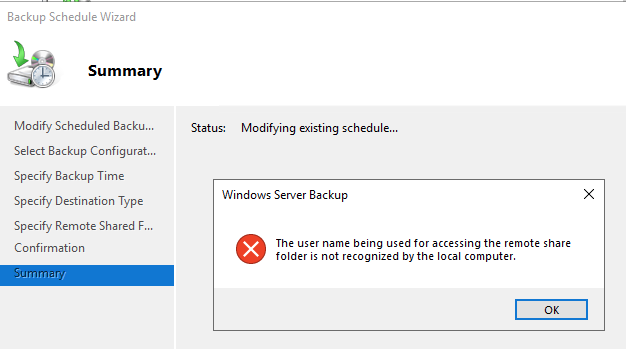
MS Windows Backup allows the option of backing up to a remote share. Since the remote folder is, remote, MS Windows Backup prompts for the remote username and password, to gain access.

Given that it is a ‘remote’ username, it is not a local user to the Windows machine that is being backed up. Yet, it fails because the remote username is unknown locally. What?? Of course it’s not known locally, because it’s a remote username.

This is a strange message to me. Behind the scenes though, and I’ll test my theory later, that I’m logged into Windows in an account that already has a network connection, mapped drive to that remote fileshare, using my own remote username. And I’m using a different remote login for backups. I think Windows Backup, is trying to test that the remote username I typed into this Backup Schedule Wizard, that it actually works. But Windows cannot make a second connection to the remote share using a different account. That’s my theory for now.

Either way, the message is strange and funny. We welcome you to use a foreign login, yet because the foreigner is not known locally, uh, no not gonna work. lol

UI Foibles

Adobe – Never stand still – UI

I have a subscription in Adobe, for Acrobat Pro, where I’ve purchased one license for each person who needs it. So 4 licenses for 4 people.

Adobe is apparently not happy with the status-quo remaining stable, and is urging me to action:

It’s not that dynamic, that I need to be urged to action. This message appears atop the page that lists the users who I have assigned licenses to. It would be fair to display that urgent “call-to-action” if I was trying to assign a new license and had run out of licenses and had to buy more to accomplish my task.

What would be better, I think, is remove that box. and add some simple text, not in a box, not highlighted, just indicating the # of licenses purchased and # assigned, would suffice for me.

What do you think?

SQL

HADR High-Availability SQL Agent Job Failovers

(Download the code for this article here)

One of the challenges in managing large, high-availability MS SQL Server systems, is to ensure that the failovers happen without a hitch.

SQL Agent Jobs are not replicated, and cannot be part of a SQL Server Availability Group (AG), so when a failover happens, jobs do not detect that the databases they rely on, are no longer available on that server node.

In this article, I show one implementation of a technique, to fail over the SQL Agent Jobs, ensuring that the right jobs are run on the right servers, according to what Always-On node it is currently regardless of failovers.

The technique is based on an article from 2010 by Kevin Cox @ Microsoft SQL Advisory Team here, which was written for SQL 2008 Mirroring, not HADR High Availability.

In this scenario we have a three server, Always-On HADR cluster:

There are three important databases on these servers, which are being replicated in Always-On HADR Availability Groups.
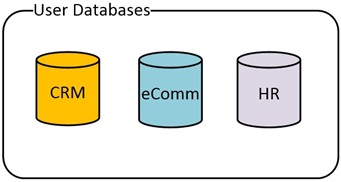
The first two databases are closely related to each other, so they are in their own Availability Group. The HR database, being single purpose, is in a separate Availability Group.
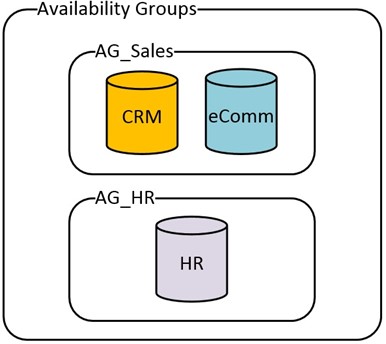
Full Picture of the Nodes, AG’s and Databases:
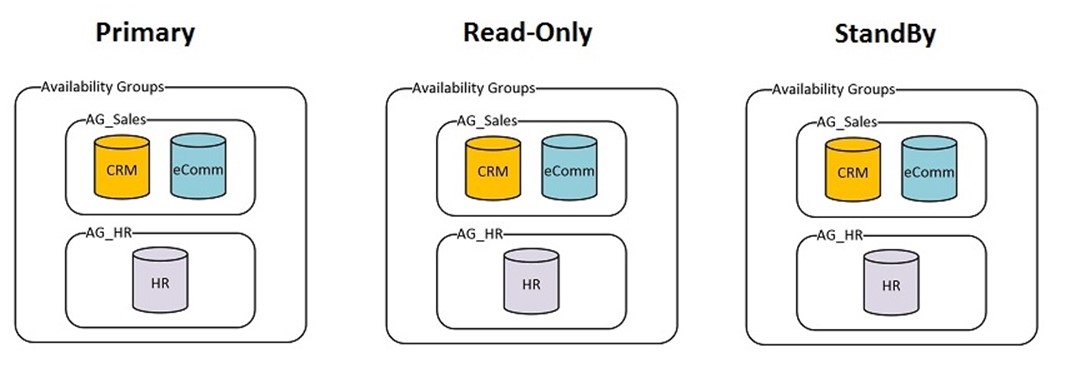
Here are some sample SQL Agent Jobs that would typically run:

Job Database dependency What Node(s) to Run it on
Backup CRM DB

CRM

Read Only

Backup eComm DB

eComm

Read Only

Backup HR DB

HR

Read Only

Sales Analytics

CRM + eComm

Read Only

Rebuild Indexes HR

HR

Primary Node

Rebuild Indexes eComm

eComm

Primary Node

Rebuild Indexes CRM

CRM

Primary Node

Index Usage Stats CRM

CRM

Primary Node + Read Only

Step 1. Create Job Categories on PRIMARY Node

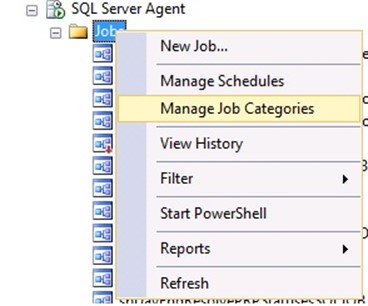
We will use Job Categories, in SQL Agent, to categorize the jobs we want to fail over. Create the Job Categories on the PRIMARY node.

Each category will allow us to group SQL Agent Jobs together, that will be failed over together. Using our list of Jobs from above, we group them into failover categories:

Job Database dependency What Node(s) to Run it on Failover Job Category
Backup CRM DB

CRM

Read Only

Sales_Failover_ReadOnly

Backup eComm DB

eComm

Read Only

Sales_Failover_ReadOnly

Backup HR DB

HR

Read Only

HR_Failover_ReadOnly

Sales Analytics

CRM + eComm

Read Only

Sales_Failover_ReadOnly

Rebuild Indexes HR

HR

Primary Node

HR_Failover_Primary

Rebuild Indexes eComm

eComm

Primary Node

Sales_Failover_Primary

Rebuild Indexes CRM

CRM

Primary Node

Sales_Failover_Primary

Index Usage Stats CRM

CRM

Primary Node + Read Only

Sales_Failover_Primary_RO


-- creates 2 local job categories 
USE msdb ;
GO
EXEC dbo.sp_add_category
@class=N'JOB', @type=N'LOCAL', @name=N'Sales_Failover_ReadOnly';
GO
EXEC dbo.sp_add_category
@class=N'JOB', @type=N'LOCAL', @name=N'HR_Failover_ReadOnly';
GO

etc…

Alternatively, you could use the UI:
Step 2. SQL Agent Operators, Jobs on PRIMARY Node

Create SQL Agent Operators, if you want to use Operators in the Jobs.

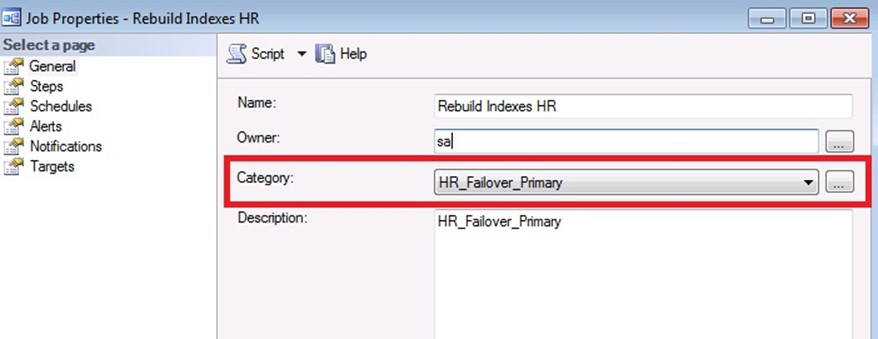
Then create all the SQL Jobs that need to be ‘failed over’, onto the PRIMARY SQL Server node. Add their schedule, but keep the jobs disabled initially.

Make sure to assign the proper Failover Job Category for each job.
Step 3. Generate CREATE Scripts, for Operators, Jobs

Once you create the Operators and Jobs on the Primary node, you can generate the CREATE Script, to run it on the other two nodes.
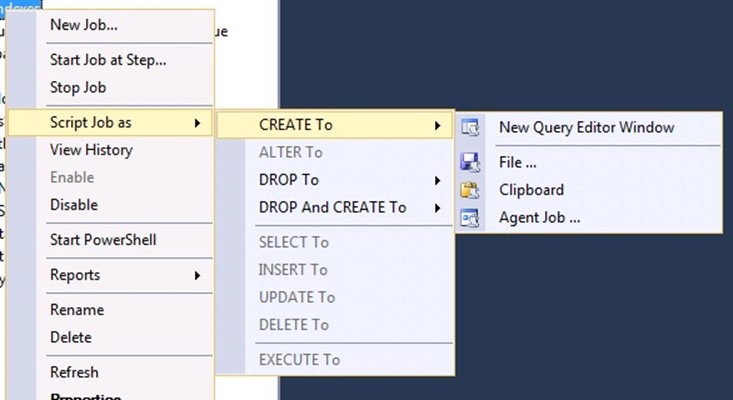
The Generate CREATE script function, for SQL Agent Jobs, will also include the CREATE T-SQL for the Job Category.

Step 4. Create an Independent database on each Node

This database will contain some configuration information about the Availability groups and the desired failover behaviour for the SQL Agent Jobs.

The disk space requirements for this database, are miniscule.

USE [master]
GO
CREATE DATABASE [ServerMonitor]
ON PRIMARY
( NAME =N'ServerMonitor', 
FILENAME =N'E:\SqlData\ServerMonitor.mdf', 
SIZE = 4096KB , MAXSIZE = UNLIMITED, FILEGROWTH = 1024KB )
LOG ON ( NAME = N'ServerMonitor_log', FILENAME =N'F:\SQLLogs\ServerMonitor_log.ldf', 
SIZE = 1024KB , MAXSIZE = 4GB , FILEGROWTH = 10%)
GO

Create the tables that will hold the configuration:

USE ServerMonitor
GO
CREATE TABLE FailoverDbControl
(
  DatabaseName VARCHAR(100) NOT NULL,
    CONSTRAINT PK_FailoverLog PRIMARY KEY CLUSTERED (DatabaseName),
  LastKnown_Hadr_State VARCHAR(50) NULL,
  Normal_Hadr_State VARCHAR(50) NULL, /* PRIMARY, READONLY, STANDBY */
  LastCheck DATETIME CONSTRAINT DF_FailoverLog_LastCheck DEFAULT ( GETDATE()) ,
  LastChange DATETIME  CONSTRAINT DF_FailoverLog_LastChange DEFAULT ( GETDATE())
)
GO

CREATE TABLE JobsOnSQLFailover
(
  JobCategoryName VARCHAR(100) NOT NULL,
    CONSTRAINT PK_JobsOnSQLFailover PRIMARY KEY CLUSTERED (JobCategoryName),
  RunOnPrimaryNode TINYINT DEFAULT(0) NOT NULL,
  RunOnReadOnlyNode TINYINT DEFAULT(0) NOT NULL,
  RunOnStandByNode TINYINT DEFAULT(0) NOT NULL, 
  DatabaseToCheck VARCHAR(100) NULL 
)
GO


--Insert the data into the Configuration tables:

INSERT
INTO JobsOnSQLFailover
( JobCategoryName, RunOnPrimaryNode, RunOnReadOnlyNode, RunOnStandByNode, DatabaseToCheck)
VALUES
('Sales_FailOver_ReadOnly', 0, 1, 0,'eComm'),
('HR_FailOver_ReadOnly',0, 1 , 0,'HR'),
('Sales_Failover_Primary_RO',1, 1 , 0,'eComm') --, etc...
GO
INSERT INTO FailoverDbControl
( DatabaseName, LastKnown_Hadr_State, Normal_Hadr_State)
VALUES
('eComm','UNKNOWN','PRIMARY'),
('HR','UNKNOWN','PRIMARY')
GO

Create the supporting Stored procedures:

USE [ServerMonitor]
GO
SET ANSI_NULLS OFF 
GO
SET QUOTED_IDENTIFIER OFF
GO
CREATE PROCEDURE [dbo].[DBAdminChangeJobStatus](@CategoryID int, @NewEnabledValue tinyint)
/*
    Purpose: sets Enabled/Disabled flag for each SQL Job in the given Job Category
*/
AS
SET NOCOUNT ON;
DECLARE @JobName nvarchar(128);
--Declare cursor
DECLARE curJobNameList CURSOR FAST_FORWARD FOR
  SELECT [name] 
  FROM msdb.dbo.sysjobs
  WHERE category_id = @CategoryID

OPEN curJobNameList;
FETCH NEXT FROM curJobNameList INTO @JobName;

WHILE @@FETCH_STATUS = 0 
BEGIN
   EXEC msdb.dbo.sp_update_job @job_name = @JobName, @enabled = @NewEnabledValue;
   FETCH NEXT FROM curJobNameList INTO @JobName;
END

CLOSE curJobNameList;
DEALLOCATE curJobNameList;
RETURN;

GO

SET ANSI_NULLS OFF 
GO
SET QUOTED_IDENTIFIER OFF
GO
 
CREATE PROCEDURE [dbo].[DBAdminCheckHADRStatus]
/*
    Checks the status of the databases in the FailoverDBControl table, and 
    if there's a change since last time checked, then enable/disable the 
    SQL Jobs in the various dependent SQL Job Categories, according to 
    the configuration set in JobsOnSQLFailover table
*/
AS
BEGIN
    SET NOCOUNT ON;
    DECLARE @DatabaseName nvarchar(128);
    DECLARE @BeginRunDateTimeStamp DATETIME
    SELECT @BeginRunDateTimeStamp = GETDATE()
    DECLARE
        @fdc_DatabaseName VARCHAR(100),
        @fdc_LastKnown_Hadr_State VARCHAR(50),
        @fdc_LastCheck DATETIME,
        @fdc_LastChange DATETIME,
        @fdc_Normal_Hadr_State VARCHAR(50),
        @current_Hadr_state VARCHAR(50), /* PRIMARY, READONLY, STANDBY */
        @current_db_state VARCHAR(50),
        @current_ReadOnlyState VARCHAR(50),
        @current_StandByState VARCHAR(50),
        @dbid INT,
        @CategoryName VARCHAR(50),
        @CatDatabase VARCHAR(50),
        @CatDb_HADR_State VARCHAR(50),
        @CategoryShouldRunOnPrimary TINYINT,
        @CategoryShouldRunOnReadOnly TINYINT,
        @CategoryShouldRunOnStandBy TINYINT,
        @CategoryID INT

    DECLARE curDb CURSOR FOR 
      SELECT DatabaseName, LastKnown_Hadr_State, LastCheck, LastChange, Normal_Hadr_State
      FROM FailoverDbControl

    OPEN curDb
    FETCH NEXT FROM curDb 
    INTO @fdc_DatabaseName,@fdc_LastKnown_Hadr_State,@fdc_LastCheck,@fdc_LastChange, 
         @fdc_Normal_Hadr_State
/* for each database that we want to check for failover [dbo].[FailOverDbControl]
 Update the Table FailOverDbControl for those that have changed.
     Afterwards, we can select * from FailOverDbControl WHERE LastChange occurred since we started this proc.
 */

    WHILE @@FETCH_STATUS = 0
    BEGIN
        SELECT @dbid = DB_ID( @fdc_DatabaseName)
        /* Get IsPrimary State. Values: PRIMARY/SECONDARY */
        SELECT @current_db_state = rs.role_desc
        FROM master.sys.dm_hadr_database_replica_states AS db
            INNER JOIN
             master.sys.dm_hadr_availability_replica_states AS rs ON db.group_id = rs.group_id
            INNER JOIN master.sys.databases dbs ON db.database_id = dbs.database_id
        WHERE db.is_local = 1 AND rs.is_local = 1 AND db.database_id = @dbid

        /* Get STANDBY Mode info: */
        SELECT @current_StandByState = CASE 
            WHEN ar.secondary_role_allow_connections = 0 THEN 'STANDBY'
            ELSE 'QUERYABLE' END 
        FROM sys.databases d JOIN sys.availability_replicas ar on d.replica_id = ar.replica_id
        WHERE d.database_id = @dbid

        /* READ_ONLY */
        /* SELECT @current_ReadOnlyState = DATABASEPROPERTYEX(@fdc_DatabaseName, 'Updateability') */
        /* Current HADR state PRIMARY, READONLY, STANDBY */
        SELECT @current_Hadr_state =
            CASE
                WHEN @current_db_state = 'PRIMARY' THEN 'PRIMARY'
                WHEN @current_db_state <> 'PRIMARY' AND @current_StandByState ='STANDYBY'
                   THEN 'STANDBY'
                ELSE 'READONLY' END

        IF @fdc_LastKnown_Hadr_State <> @current_Hadr_state
        BEGIN
            UPDATE FailoverDbControl SET LastKnown_Hadr_State = @current_Hadr_state,
                   LastCheck = GETDATE(), LastChange =GETDATE()
            WHERE CURRENT OF curDb;
        END
        ELSE
        BEGIN
            UPDATE FailoverDbControl SET LastCheck =  GETDATE()
            WHERE CURRENT OF curDb;
        END

        FETCH NEXT FROM curDb
        INTO @fdc_DatabaseName,@fdc_LastKnown_Hadr_State,@fdc_LastCheck,@fdc_LastChange, 
             @fdc_Normal_Hadr_State
    END

   CLOSE curDb;
   DEALLOCATE curDb;

    DECLARE curCategories CURSOR FOR
    SELECT j.JobCategoryName, j.RunOnPrimaryNode, j.RunOnReadOnlyNode, 
           j.RunOnStandByNode, sc.category_id, lcs.DatabaseName, lcs.LastKnown_Hadr_State
    FROM JobsOnSQLFailover j INNER JOIN msdb.dbo.syscategories sc
        on j.JobCategoryName = sc.[name]
    INNER JOIN
       (SELECT DatabaseName, LastKnown_Hadr_State 
        FROM FailoverDbControl WHERE LastChange > @BeginRunDateTimeStamp
        ) lcs
    ON j.DatabaseToCheck = lcs.DatabaseName

    OPEN curCategories
    FETCH NEXT FROM curCategories
    INTO @CategoryName, @CategoryShouldRunOnPrimary, @CategoryShouldRunOnReadOnly, 
         @CategoryShouldRunOnStandBy, @CategoryId, @CatDatabase, @CatDb_HADR_State

    WHILE @@FETCH_STATUS = 0
    BEGIN
        IF @CatDb_HADR_State = 'PRIMARY' /* a new state */
        BEGIN
            PRINT 'FailOver Change to PRIMARY. Adjusting Jobs in category: ' + @CategoryName
            EXEC [dbo].[DBAdminChangeJobStatus] @CategoryID, @CategoryShouldRunOnPrimary
        END

        IF @CatDb_HADR_State = 'READONLY' /* a new state */
        BEGIN
            PRINT 'FailOver Change to READONLY. Adjusting Jobs in category: ' + @CategoryName
            EXEC [dbo].[DBAdminChangeJobStatus] @CategoryID, @CategoryShouldRunOnReadOnly
        END

        IF @CatDb_HADR_State = 'STANDBY' /* a new state */
        BEGIN
            PRINT 'FailOver Change to STANDBY. Adjusting Jobs in category: ' + @CategoryName
            EXEC [dbo].[DBAdminChangeJobStatus] @CategoryID, @CategoryShouldRunOnStandBy
        END


        FETCH NEXT FROM curCategories
        INTO @CategoryName, @CategoryShouldRunOnPrimary, @CategoryShouldRunOnReadOnly, 
             @CategoryShouldRunOnStandBy, @CategoryId, @CatDatabase, @CatDb_HADR_State

    END

    CLOSE curCategories
    DEALLOCATE curCategories

    RETURN;
END

GO

Step 6. Copy the ServerMonitor
database to the other two Server Nodes.

I used ‘Generate Scripts’ as CREATE for the database, ran all the T-SQL scripts on the other two nodes. This database must be identical, and available on all three nodes no matter which one is primary for availability group, so do not replicate.

Step 7. Create and Schedule a Job, on each Node, to Monitor HADR status.

Finally, we need a SQL Agent Job, that checks to see if a failover has occurred, and enable / disable the SQL jobs according to the configuration in the JobsOnSQLFailover table.
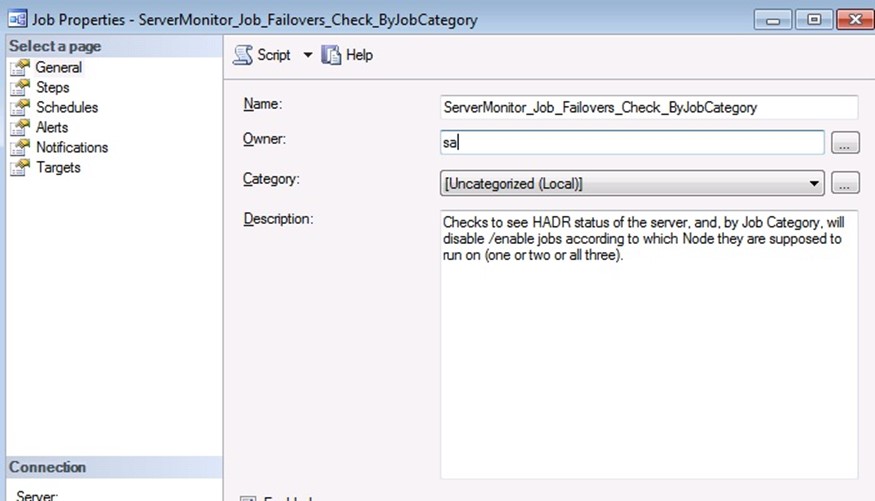
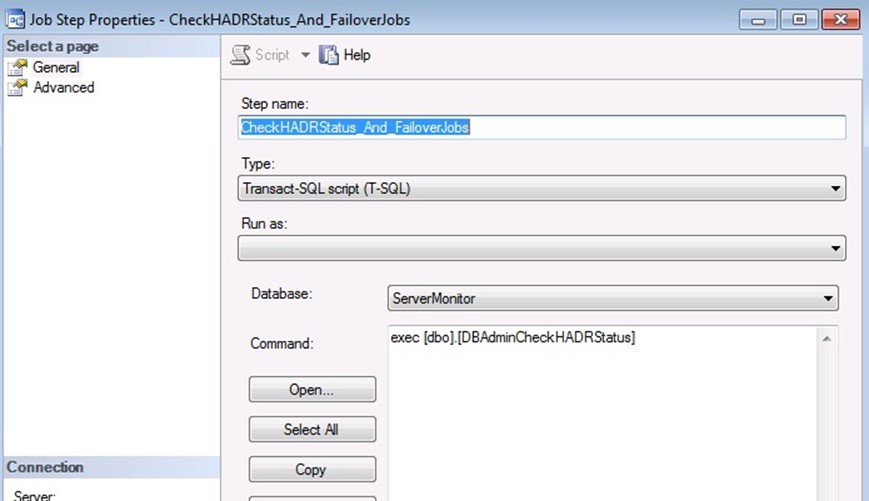
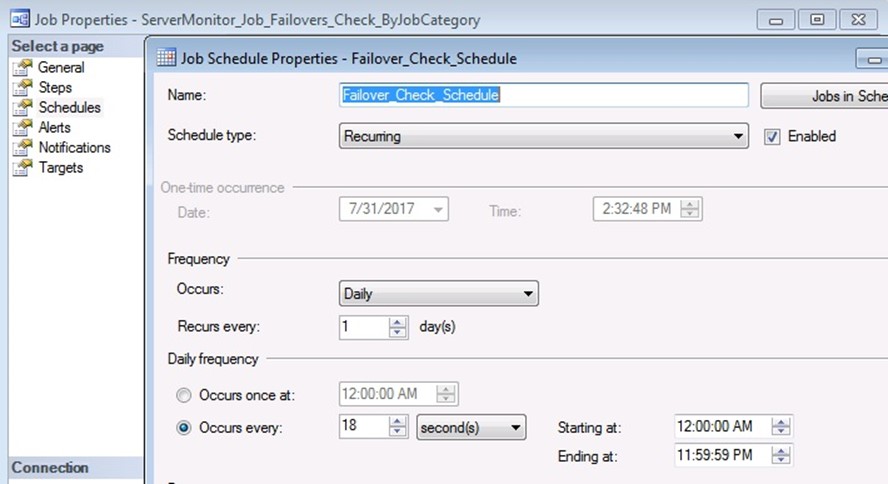
I scheduled it to run every 18 seconds; you may want a longer interval, maybe every 1 minute instead. The longer you make this interval, the more possibility that when a HADR failover occurs, a SQL Job may start on the wrong server and fail (because database not available).

Copy this job to all three servers. Do NOT put this job in one of our new SQL Agent Job Categories. You can see here, that I placed it into the [Uncategorized] category.

Initially, the state of the FailoverDbControl table, shows ‘Last Known HADR state’ = ‘Unknown’, so, the first time this monitoring Job runs, it will enable/disable all the jobs on that server, to their proper state.

Here is a sample output from the Job History:

Date        7/31/2017 1:45:22 PM

Log        Job History (ServerMonitor_Job_Failovers_Check_ByJobCategory)

Step ID        1

Job Name        ServerMonitor_Job_Failovers_Check_ByJobCategory

Step Name        CheckHADRStatus_And_FailoverJobs

Duration        00:00:00

Message: Executed as user:. FailOver Change to PRIMARY. Adjusting Jobs in category: Sales_FailOver_Primary [SQLSTATE 01000] (Message 0) FailOver Change to PRIMARY. Adjusting Jobs in category: HR_FailOver_Primary [SQLSTATE 01000] (Message 0). The step succeeded.

Uncategorized

List of GRANTS and DENIES for All Users

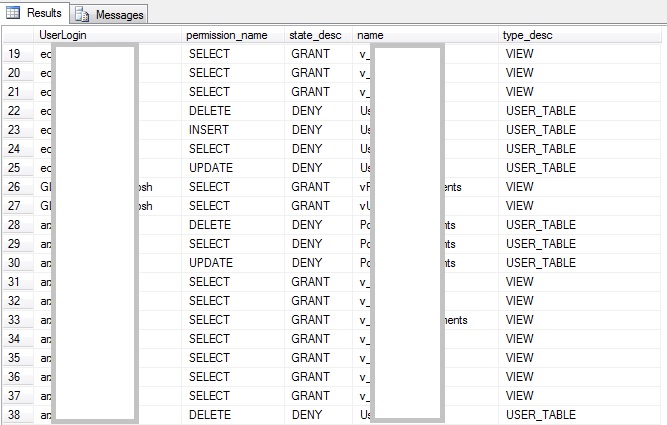
I find it useful sometimes, to be able to obtain a list of specific permissions that were Granted or Denied to users (roles), in a SQL database.   For example, useful when producing evidence for a PCI DSS or SSAE16 security audit, for separation of duties, or just keeping the permissions matrix documentation up to date.

Here is the code I used for that:

DECLARE @outsql
VARCHAR(1000), @resultSQL NVARCHAR(MAX)
SELECT @resultSQL ''
SELECT @outsql  N'
SELECT
''##UserLogin##'' AS UserLogin, p.permission_name, p.state_desc, o.name, o.type_desc
FROM sys.database_permissions p INNER JOIN sys.objects o
ON p.major_id = o.object_id
WHERE grantee_principal_id = USER_ID(''##UserLogin##'')
UNION ALL
'

SELECT  @resultSQL = @resultSQL + REPLACE(@outsql , '##UserLogin##', [name])
FROM sys.sysusers
WHERE islogin 1 AND (isntgroup =OR isntuser =OR issqluser = 1)

SELECT @resultSQL = @resultSQL + N'

       SELECT ''##UserLogin##'' AS UserLogin,
p.permission_name, p.state_desc, o.name, o.type_desc
FROM sys.database_permissions p INNER JOIN sys.objects o ON p.major_id = o.object_id
WHERE grantee_principal_id = -100

'

EXEC  sp_executesql @resultSQL


This produces results like this:

permissions results


With a little tweaking, this code can be changed to instead re-create the actual GRANT and DENY SQL scripts (for PRINTing, not sp_executeSQL) to use somewhere else.


SQL

Flexible Numbering Sequences in SQL

I posted this article on CodeProject.com a while back.   The problem it solves, comes up from time to time.    I wrote it, as part of  the online donations site, for SunnyBrook Hospital Foundation.  The system accepted the donation, and would automatically generate a PDF of the official tax receipt for Charitable donations.

I also posted code for load-testing, in the ‘comments’ section on that page.

https://www.codeproject.com/articles/Flexible-numbering-sequences-in-T-SQL

SQL, Uncategorized

Deciles – Balanced, approximate groupings in SQL

This problem came up in real life today. A client wanted a report of accounts, in 10 groups of credit score ranges, where approximately 1/10 of the accounts would be in each group.   The exact ranges were to be figured out, based on an approximately even distribution of accounts in each group.

To do this manually is a simple task for a human, in Excel–dump the data into Excel, sort it, and scroll to approx 1/10 of the list. Once there, see what the credit score is, and manually determine where to draw the line.

e.g.   Here is a table I populated with random data (script included).  This is a Select top 100, sorted by Credit Score.    The desired results would have 10 rows, summary, which are ranges of credit scores with the number of accounts in each range.

Each group would be approximately 10 accounts per group.   No credit score value should be in multiple groups.

Take a look down the list at the 10th row.


Row# Account BillingName CreditScore InitialBalance OpenedDate
1 31603 Jack Simpson 10 8844.92 2017-03-16
2 31035 Jack Brown 30 1138.19 2017-03-16
3 62276 John Smith 30 5465.08 2017-03-16
4 60812 Mary Smith 60 1851.96 2017-03-16
5 63958 Rachel Brown 60 2302.57 2017-03-16
6 64241 Mary Taylor 60 7638.2 2017-03-16
7 63387 Bill Taylor 70 7510.62 2017-03-16
8 61690 Bob Elliot 80 5725.46 2017-03-16
9 28780 Jack Morgan 90 10155.96 2017-03-16
10 28984 Ann Smith 90 7406.19 2017-03-16
11 30053 Bill Brown 90 2488.14 2017-03-16
12 61733 Bob Brown 90 11745.65 2017-03-16
13 62854 Bill Elliot 90 7425.37 2017-03-16
14 64583 Bill Smith 100 11920.82 2017-03-16
15 30179 John Simpson 110 1680.3 2017-03-16

The credit score on the 10th row is ’90’.  That is the same value as rows 9 and 11 and 12 and 13.   The first group should either contain all the ’90’ score accounts, or none of them.  As a human, I would base this decision on how far into the list of ’90’ value accounts we are, at the 10th row.   In this example, row 10 is only the 2nd of 5 ’90’ values, I would put all the ’90’ values into the 2nd group of 10.

So, how do we do this in SQL?    I am not sure.    But, this is how I solved it, using the LAG function in SQL Server 2012:

;WITH acs as
(
 select a.account, creditscore,
 ROW_NUMBER() OVER(ORDER BY creditscore) AS [ROW_NUMBER],
 NTILE(10) OVER(ORDER BY creditscore) AS [NTILE]
 from accounts (nolock) a
),
acs2 as
(
 select acs.[NTILE], min( CreditScore) as MinScore, 
  max(CreditScore) as MaxScore, count(*) as NumInNTILE
 from acs
 group by [NTILE]
),
acs3 as
(
 select *, ROW_NUMBER() OVER 
      (PARTITION BY CreditScore Order BY [row_number] ) as rowInScore
 from acs
)
,
tilesAndCounts AS
(
 SELECT CreditScore, MAX( rowInScore) as MaxRowInScore
 FROM acs3
 group by CreditScore
)
,
acs4 AS (
 
 select acs.Account, acs.CreditScore, acs.[ROW_NUMBER], acs.[NTILE]
 ,
 CASE WHEN LAG( acs.[NTILE], 1) OVER (ORDER BY acs.[ROW_NUMBER]) <> 
      acs.[NTILE] AND 
     LAG( acs.CreditScore, 1) OVER (ORDER BY acs.[ROW_NUMBER]) = 
         acs.CreditScore
     AND ( rowInScore / MaxRowInScore < 0.5) THEN acs.[NTILE] - 1
 WHEN LAG( acs.[NTILE], 1) OVER (ORDER BY acs.[ROW_NUMBER]) <>  
     acs.[NTILE] AND 
    LAG( acs.CreditScore, 1) OVER (ORDER BY acs.[ROW_NUMBER]) = 
        acs.CreditScore
 AND ( rowInScore / MaxRowInScore >= 0.5) THEN acs.[NTILE]
 END AS NTileAdjusted
 from acs
 inner join acs3 on acs.[ROW_NUMBER] = acs3.[ROW_NUMBER]
 inner join tilesAndCounts ON acs.CreditScore = tilesAndCounts.CreditScore
),
acs5 as (
 Select CreditScore, MIN( COALESCE( NTileAdjusted, [NTILE]) ) AS MinNTile
 from acs4
 group by CreditScore
)
, acs6 as (
 Select acs4.*, MinNTile
 from acs4 inner join acs5 ON acs4.CreditScore = acs5.CreditScore
)
select MinNTile, min(CreditScore) as minScore, 
    max(CreditScore) as maxscore, count(*) AS NumAccounts
from acs6
group by MinNTile
order by MinNTile

The results show 10 groups, with approximately 10,000 accounts in each group, based on ranges of credit scores:

MinNTile minScore maxscore NumAccounts
1 0 99                     10,010
2 100 199                     10,077
3 200 299                       9,964
4 300 400                     10,043
5 401 500                       9,959
6 501 600                     10,019
7 601 701                     10,034
8 702 801                       9,920
9 802 900                     10,032
10 901 998                       9,942

Because I used random data, you can see the numbers are spread pretty evenly.   In real life, credit scores were not so evenly spread 😉


Here is the Create Table statement:

CREATE TABLE Accounts
(
 Account INT IDENTITY(1,1) NOT NULL
 CONSTRAINT PK_Accounts PRIMARY KEY,
 BillingName VARCHAR(100) NULL,
 CreditScore SMALLINT NOT NULL
 CONSTRAINT DF_Accounts_CreditScore DEFAULT(0),
 InitialBalance DECIMAL(18,2) NOT NULL
 CONSTRAINT DF_Accounts_InitialBalance DEFAULT(0),
 NetPaid DECIMAL(18,2) NOT NULL
 CONSTRAINT DF_Accounts_NetPaid DEFAULT(0),
 OpenedDate DATETIME NOT NULL
 CONSTRAINT DF_Accounts_OpenedDate DEFAULT(GETDATE())
)

GO


I used this code to generate the 100,000 random accounts data:

INSERT INTO Accounts ( OpenedDate, CreditScore, BillingName, InitialBalance)
SELECT TOP 100000 
DATEADD(DAY,-( dbo.RANDBETWEEN(0,90,RAND(CHECKSUM(NEWID()))) ),getdate() ),
cast( RAND(CHECKSUM(NEWID())) * 999 as smallint), 
CASE
 WHEN dbo.RANDBETWEEN(0,9,RAND(CHECKSUM(NEWID()))) = 0 THEN 'John'
 WHEN dbo.RANDBETWEEN(0,9,RAND(CHECKSUM(NEWID()))) = 1 THEN 'Jack'
 WHEN dbo.RANDBETWEEN(0,9,RAND(CHECKSUM(NEWID()))) = 2 THEN 'Bill'
 WHEN dbo.RANDBETWEEN(0,9,RAND(CHECKSUM(NEWID()))) = 3 THEN 'Mary'
 WHEN dbo.RANDBETWEEN(0,9,RAND(CHECKSUM(NEWID()))) = 4 THEN 'Kate'
 WHEN dbo.RANDBETWEEN(0,9,RAND(CHECKSUM(NEWID()))) = 5 THEN 'Matt'
 WHEN dbo.RANDBETWEEN(0,9,RAND(CHECKSUM(NEWID()))) = 6 THEN 'Rachel'
 WHEN dbo.RANDBETWEEN(0,9,RAND(CHECKSUM(NEWID()))) = 7 THEN 'Tom'
 WHEN dbo.RANDBETWEEN(0,9,RAND(CHECKSUM(NEWID()))) = 8 THEN 'Ann'
 WHEN dbo.RANDBETWEEN(0,9,RAND(CHECKSUM(NEWID()))) = 9 THEN 'Andrew'
 ELSE 'Bob' END + ' ' +
 CASE
 WHEN dbo.RANDBETWEEN(0,9,RAND(CHECKSUM(NEWID()))) = 0 THEN 'Smith'
 WHEN dbo.RANDBETWEEN(0,9,RAND(CHECKSUM(NEWID()))) = 1 THEN 'Morgan'
 WHEN dbo.RANDBETWEEN(0,9,RAND(CHECKSUM(NEWID()))) = 2 THEN 'Simpson'
 WHEN dbo.RANDBETWEEN(0,9,RAND(CHECKSUM(NEWID()))) = 3 THEN 'Walker'
 WHEN dbo.RANDBETWEEN(0,9,RAND(CHECKSUM(NEWID()))) = 4 THEN 'Bauer'
 WHEN dbo.RANDBETWEEN(0,9,RAND(CHECKSUM(NEWID()))) = 5 THEN 'Taylor'
 WHEN dbo.RANDBETWEEN(0,9,RAND(CHECKSUM(NEWID()))) = 6 THEN 'Morris'
 WHEN dbo.RANDBETWEEN(0,9,RAND(CHECKSUM(NEWID()))) = 7 THEN 'Elliot'
 WHEN dbo.RANDBETWEEN(0,9,RAND(CHECKSUM(NEWID()))) = 8 THEN 'White'
 WHEN dbo.RANDBETWEEN(0,9,RAND(CHECKSUM(NEWID()))) = 9 THEN 'Davis'
 ELSE 'Brown' END 
,
cast( RAND(CHECKSUM(NEWID())) * 12000 as decimal(18,2))
FROM sys.all_objects a
CROSS JOIN sys.all_objects b

I used this from AndreFeijo from here: http://stackoverflow.com/questions/15608438/how-can-i-populate-my-databases-all-tables-with-random-data

I really like the use of TOP n, with the CROSS JOIN sys.all_objects to itself, a great way to generate lots of rows, when you don’t want or need a table to query.

-- Create the RANDBETWEEN function
-- Usage: SELECT dbo.RANDBETWEEN(0,9,RAND(CHECKSUM(NEWID())))
CREATE FUNCTION dbo.RANDBETWEEN(@minval TINYINT, @maxval TINYINT, @random NUMERIC(18,10))
RETURNS TINYINT
AS
BEGIN
 RETURN (SELECT CAST(((@maxval + 1) - @minval) * @random + @minval AS TINYINT))
END
GO


.


SQL

Script Object Changes to File


This was used to solve a specific problem, but some of the techniques here may be of general interest.

A DDL Trigger, operates at the database level, to capture DDL changes.  There are many good articles about using DDL triggers.    I’m not going to repeat the same info here; instead, here is an article that’s pretty good, about DDL Triggers:  https://www.mssqltips.com/sqlservertip/2085/sql-server-ddl-triggers-to-track-all-database-changes/

So, the scenario is that we have a table where DDL changes are logged, via the DDL Trigger.   The log includes the actual SQL statement that was run at that time.  The changes to the database needed to be scripted out to .sql files.

The solution here, uses SQL’s ability to instantiate COM objects, and the Windows Scripting FileSystemObject COM component.


To allow SQL to use COM Objects, we have to use the sp_configure system stored procedure:

--this allows SQL server to instantiate COM objects:
sp_configure 'show advanced options', 1;
GO
RECONFIGURE;
GO
sp_configure 'Ole Automation Procedures', 1;
GO
RECONFIGURE;
GO


Next, create a stored procedure that will write to file:

--Create the sproc:
SET ANSI_NULLS ON
GO
SET QUOTED_IDENTIFIER ON
GO

CREATE PROCEDURE [dbo].[WriteToTextFile]
@File VARCHAR(2000),
@Text VARCHAR(MAX),
@AppendYN CHAR(1) = 'N'

AS 

BEGIN 

DECLARE @OLE INT 
DECLARE @FileID INT 
DECLARE @OverwriteAppendMode INT

IF @AppendYN = 'Y'
 SET @OverwriteAppendMode = 8
ELSE
 SET @OverwriteAppendMode = 2 

EXECUTE sp_OACreate 'Scripting.FileSystemObject', @OLE OUT 

/*
The sp_OAMethod is executing method of the given object, 
in this case is a FileSystemObject OpenTextFile has 4 parameters in this order:
FilePath -Required. The name of the file to open
Mode - Optional. How to open the file
1 = Reading - Open a file for reading. You cannot write to this file.
2 = Writing - Open a file for writing.
8 = Appending - Open a file and write to the end of the file.
Create - Optional. Sets whether a new file can be created if the filename does not exist. True indicates that a new file can be created, and False indicates that a new file will not be created. False is default.
Format - Optional. The format of the file
0 = TristateFalse - Open the file as ASCII. This is default.
1 = TristateTrue - Open the file as Unicode.
2 = TristateUseDefault - Open the file using the system default.
*/
EXECUTE sp_OAMethod @OLE, 'OpenTextFile', @FileID OUT, @File, @OverwriteAppendMode , 1, 0 

EXECUTE sp_OAMethod @FileID, 'WriteLine', Null, @Text

EXECUTE sp_OADestroy @FileID 
EXECUTE sp_OADestroy @OLE 

END 


Here is the actual code that writes the changes to files.


DECLARE @objectname varchar(250)
DECLARE @objecttype varchar(100)
DECLARE @db VARCHAR(100)
DECLARE @eventtype VARCHAR(100)
DECLARE @hostPCname VARCHAR(100)
DECLARE @eventdate DATETIME
DECLARE @sqlcommand VARCHAR(MAX)
DECLARE @Path VARCHAR(2000)
DECLARE @Txt VARCHAR(max)
DECLARE @headertext VARCHAR(2000)
DECLARE @appendThis CHAR(1)

DECLARE @c AS CURSOR

SET @c = CURSOR FOR
SELECT databasename, eventtype, objectname, objecttype, sqlcommand, eventdate, HostPCName 
FROM DDLChangeLog
ORDER BY logid

OPEN @c

FETCH NEXT FROM @c INTO @db, @eventtype, @objectname, @objecttype, @sqlcommand, @eventdate, @HostPCName

WHILE @@FETCH_STATUS = 0
BEGIN
-- procs, views and functions, just replace the entire file with new defn
-- other objects, append for ALTERs, replace for CREATEs/DROPs
SELECT @appendThis = CASE WHEN @objecttype IN ('PROCEDURE', 'VIEW', 'FUNCTION') THEN 'N' 
 WHEN @eventtype LIKE 'ALTER%' THEN 'Y' ELSE 'N' END

 SELECT @headertext = N'
 /**********************************************
 Object Name: @objectname
 Database : @db
 Changed On : @eventdate
 Changed By : @hostPCName
 */

 '
 SELECT @headertext = REPLACE(@headertext , '@objectname', @objectname)
 SELECT @headertext = REPLACE(@headertext , '@db', @db)
 SELECT @headertext = REPLACE(@headertext , '@eventdate', CONVERT(VARCHAR(20),@eventdate,120) )
 SELECT @headertext = REPLACE(@headertext , '@hostPCName', @hostPCName)

SELECT @txt = @headertext + @sqlcommand
 SELECT @Path = N'\\servername\sharename\SQLout\' + @objecttype + N'\[dbo].['+ @objectname + N'].sql'

EXEC [dbo].[WriteToTextFile] @Path, @Txt, @appendThis
--could use xp_cmdshell here, to check .sql file into source control, or copy it etc...
FETCH NEXT FROM @c INTO @db, @eventtype, @objectname, @objecttype, @sqlcommand, @eventdate, @HostPCName

END

CLOSE @c
DEALLOCATE @c


The DDLChangeLog table is like this:

CREATE TABLE [dbo].[DDLChangeLog](
[LogId] [int] IDENTITY(1,1) NOT NULL,
[DatabaseName] [VARCHAR](256) NOT NULL,
[EventType] [VARCHAR](50) NOT NULL,
[ObjectName] [VARCHAR](256) NOT NULL,
[ObjectType] [VARCHAR](25) NOT NULL,
[SqlCommand] [VARCHAR](MAX) NOT NULL,
[EventDate] [DATETIME] NOT NULL CONSTRAINT [DF_DDLChangeLog_EventDate] DEFAULT (GETDATE()),
[LoginName] [vARCHAR] (256) NOT NULL,
[HostPCName] [vARCHAR] (250) NULL
)

The DDL Trigger is like this, simple:

SET ANSI_NULLS ON
GO

SET QUOTED_IDENTIFIER ON
GO

CREATE TRIGGER [backup_objects]
ON DATABASE
FOR CREATE_PROCEDURE, ALTER_PROCEDURE, DROP_PROCEDURE,
CREATE_TABLE, ALTER_TABLE, DROP_TABLE,
CREATE_VIEW, ALTER_VIEW, DROP_VIEW,
CREATE_FUNCTION, ALTER_FUNCTION, DROP_FUNCTION
AS

SET NOCOUNT ON

DECLARE @data xml
SET @data = EVENTDATA()

INSERT INTO DDLChangeLog(databasename, eventtype,
objectname, objecttype, sqlcommand, loginname, HostPCName)
VALUES(
@data.value('(/EVENT_INSTANCE/DatabaseName)[1]', 'varchar(256)'),
@data.value('(/EVENT_INSTANCE/EventType)[1]', 'varchar(50)'),
@data.value('(/EVENT_INSTANCE/ObjectName)[1]', 'varchar(256)'),
@data.value('(/EVENT_INSTANCE/ObjectType)[1]', 'varchar(25)'),
@data.value('(/EVENT_INSTANCE/TSQLCommand)[1]', 'varchar(max)'),
@data.value('(/EVENT_INSTANCE/LoginName)[1]', 'varchar(256)'),
CAST( HOST_NAME() AS VARCHAR(250))
)

GO

SET ANSI_NULLS OFF
GO

SET QUOTED_IDENTIFIER OFF
GO

ENABLE TRIGGER [backup_objects] ON DATABASE
GO


SQL

Comma Separated lists using inline SQL

I think that this is brilliant!   I found this solution on SQL Authority’s site:

http://blog.sqlauthority.com/2009/11/25/sql-server-comma-separated-values-csv-from-table-column/

It is the most unique way of building a comma separated list in SQL that I have seen.    Most methods, and the ones I have used before as well, required building a user-defined function in SQL.  This one is unique in that it is:

1. Simple

2. can be used inline, in the SELECT statement.

Nice!   Thank you Pinal Dave!

For reference, his example code is :

SELECT SUBSTRING(
(SELECT ',' + s.ColumnName
FROM TableName s
ORDER BY s.ColumnName
FOR XML PATH('')),2,200000) AS CSV
GO

For me, I added it inline to a SELECT statement.

SELECT
 u1.UserId,
 u1.Department,
 u1.EmployeeID,
 u1.ReportsTo as [Manager Name],
 (
 SELECT SUBSTRING(
 (SELECT ',' + s.PhoneNumber
 FROM UserPhones s
 WHERE s.UserID=u1.UserId and PhoneStatus='Active'
 ORDER BY s.UserId, s.PhoneNumber
 FOR XML PATH('')),2,1000) AS CSV
 ) as ActivePhoneNumbers
 FROM Users as u1